
SSO passwordless per applicazioni moderne e legacy
Sostituisca le password e l'MFA tradizionale con passkey o autenticazione mobile. Offra ai dipendenti un'unica esperienza di single sign-on sicura su applicazioni web abilitate all'SSO, legacy e personalizzate.
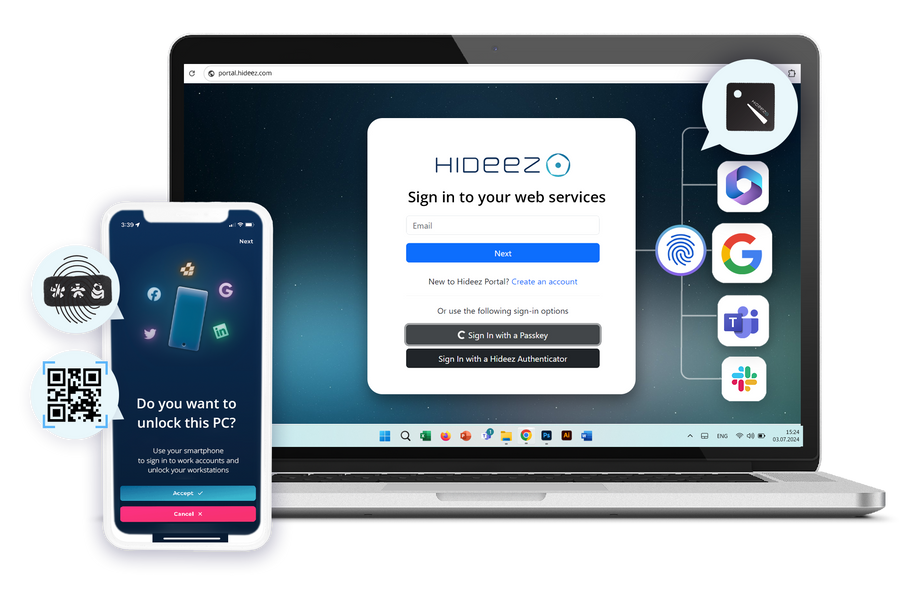

Un unico single sign-on che raggiunge tutto

Un’identità unica su tutte le app
Microsoft 365, applicazioni web moderne e applicazioni legacy che non supportano SAML: tutte accessibili con la stessa esperienza di SSO aziendale.

Progettato per resistere al phishing
La chiave privata resta protetta sul dispositivo dell’utente e non viene mai trasmessa, senza lasciare password o codici che un attaccante possa sottrarre tramite phishing.

Mantiene la directory già in uso
Hideez si federa con Active Directory e Microsoft Entra ID, così utenti, gruppi e policy restano invariati.

Hosting a Sua scelta
Esegua la soluzione SSO nel nostro cloud, in un cloud privato isolato, oppure completamente on-premise sul Suo dominio di accesso.
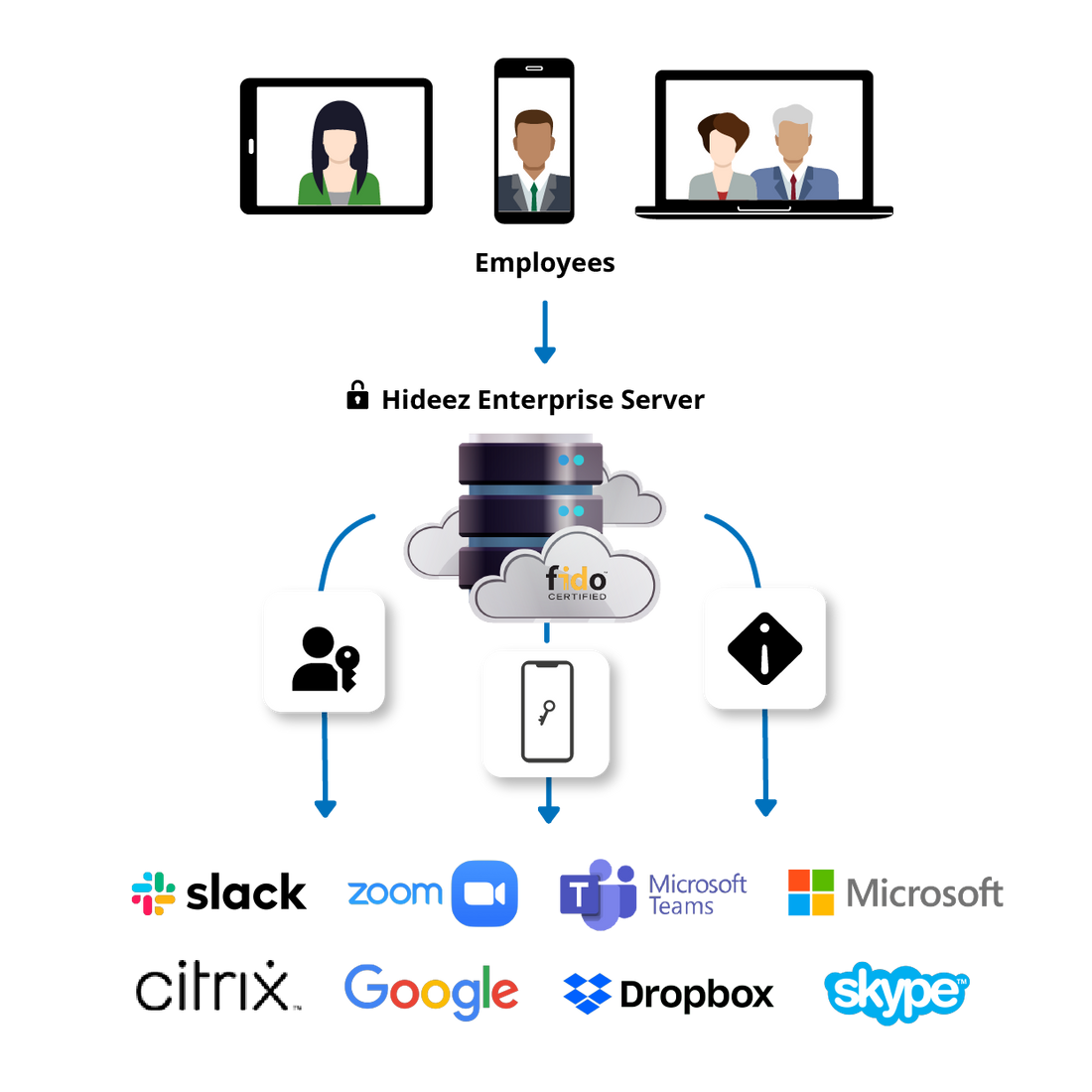
Cosa fa davvero il single sign-on (SSO)
Il single sign-on significa che un'unica identità verificata apre tutte le applicazioni che una persona è autorizzata a usare. Si autentica una sola volta e ogni applicazione si fida di questo risultato invece di richiedere una propria password. Il servizio che esegue la verifica è l'identity provider; tutto ciò che si fida di esso è un service provider.
La maggior parte delle implementazioni di single sign-on inizia ancora quell'unico accesso con una password e un codice monouso, ed è proprio lì che risiedono l'attrito e il rischio di phishing. Hideez utilizza gli stessi flussi di federazione SAML e OpenID Connect, ma avvia l'autenticazione con una credenziale senza password memorizzata sullo smartphone o sulla chiave di sicurezza hardware dell'utente.
- Federazione single sign-on con Active Directory e Microsoft Entra ID
- SAML 2.0 e OpenID Connect per le applicazioni moderne
- Applicazioni senza supporto SSO coperte tramite Hideez AuthShield
- Un unico registro di audit per tutto questo
Vantaggi dello SSO senza password per le aziende
L'SSO senza password combina l'accesso centralizzato con un'autenticazione resistente al phishing per un accesso aziendale più semplice.
- Accesso più rapido e meno macchinoso. I dipendenti si autenticano una sola volta e si spostano tra le applicazioni connesse senza digitare una password o un codice monouso.
- Resistente al phishing per progettazione. La credenziale è vincolata al dispositivo che la conserva, quindi non c'è nulla da digitare, intercettare o riutilizzare su una pagina di accesso falsa.
- Meno ticket legati alle password. Senza password nel flusso di accesso, l'IT registra meno reset, blocchi e richieste di recupero account.
- Controllo degli accessi centralizzato. La piattaforma SSO aziendale applica policy coerenti su applicazioni cloud, on-premise e legacy. Gli amministratori revocano l'accesso in modo centralizzato al variare dei ruoli.
- Conformità e audit più semplici. Ogni accesso registra la persona, l'applicazione e il metodo in un registro esportabile.
Funzionalità principali della soluzione di Single Sign-On (SSO) aziendale Hideez

Autenticazione senza password con SSO aziendale
Gli utenti approvano l'accesso con passkey, biometria del dispositivo, Hideez Authenticator o chiavi di sicurezza FIDO2 invece di password e codici OTP.

Ampia integrazione delle applicazioni
La soluzione SSO aziendale supporta SAML 2.0 e OpenID Connect, mentre AuthShield estende l'accesso alle applicazioni legacy prive di supporto alla federazione.
Distribuzione flessibile dello SSO
Distribuisca il software SSO nel cloud Hideez, in un cloud privato isolato o on-premise, con un dominio di accesso personalizzato.

Federazione della directory e gestione centralizzata
Sincronizzi gli utenti e i gruppi di Active Directory o Entra ID, quindi gestisca le policy SSO da un'unica console.

Monitoraggio SSO unificato
Tenga traccia dei metodi di autenticazione e degli accessi alle applicazioni in un unico registro per la visibilità sull'intero ambiente SSO.
Single sign-on senza password con autenticazione unificata

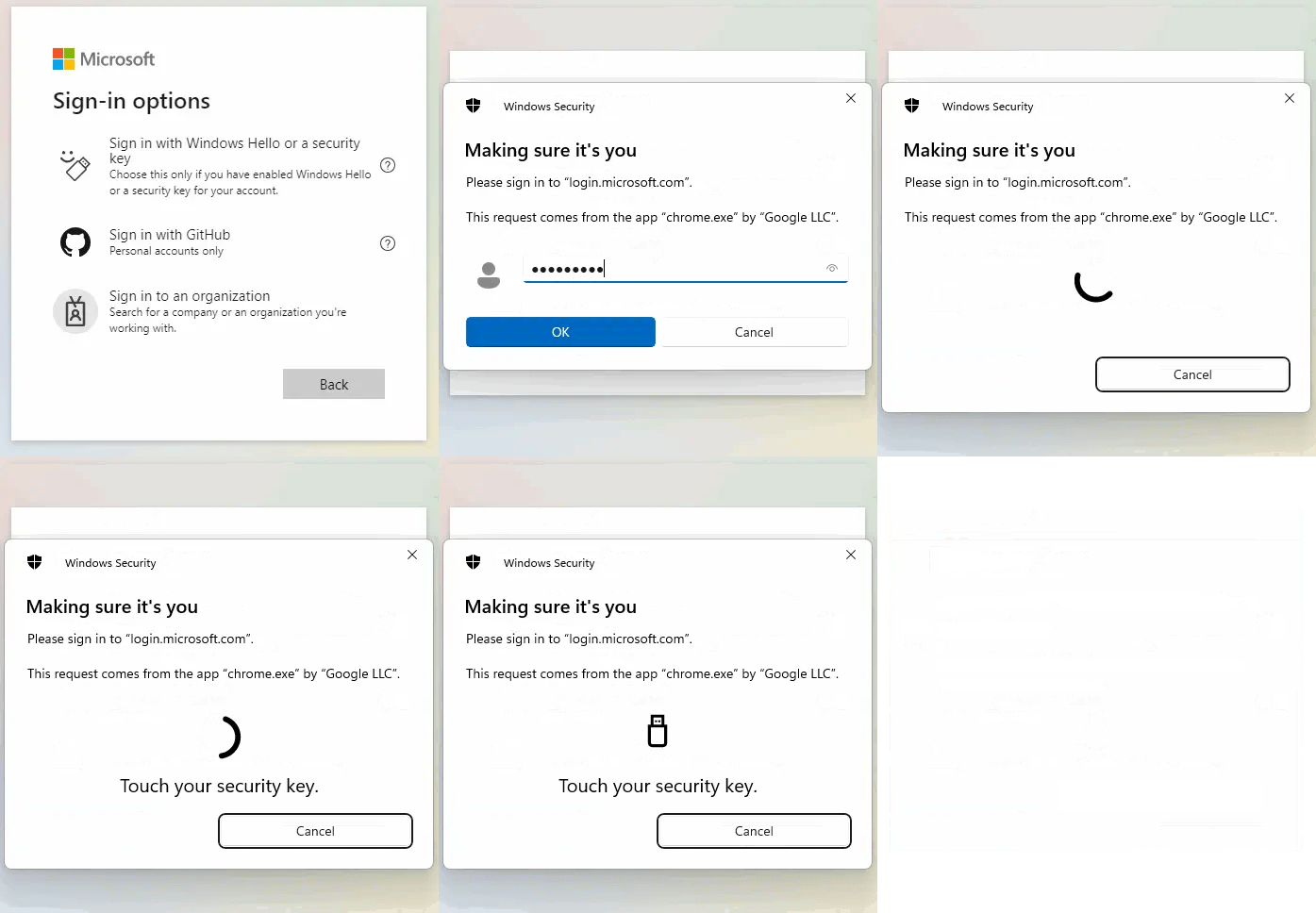
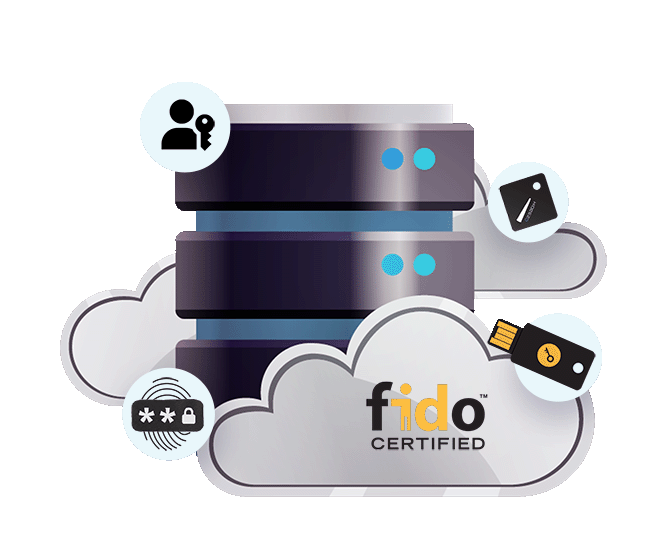
Le passkey utilizzano la crittografia a chiave pubblica invece delle password. La chiave privata resta protetta sul telefono, tablet, computer o chiave di sicurezza dell’utente ed è sbloccata tramite dati biometrici o un PIN del dispositivo.
La credenziale crittografica è memorizzata su una chiave di sicurezza esterna certificata FIDO (Hideez Key, YubiKey, ecc.) piuttosto che sul telefono o sul computer dell’utente. La chiave privata resta protetta all’interno del dispositivo e viene utilizzata per autenticare l’utente senza esporre alcun segreto riutilizzabile.
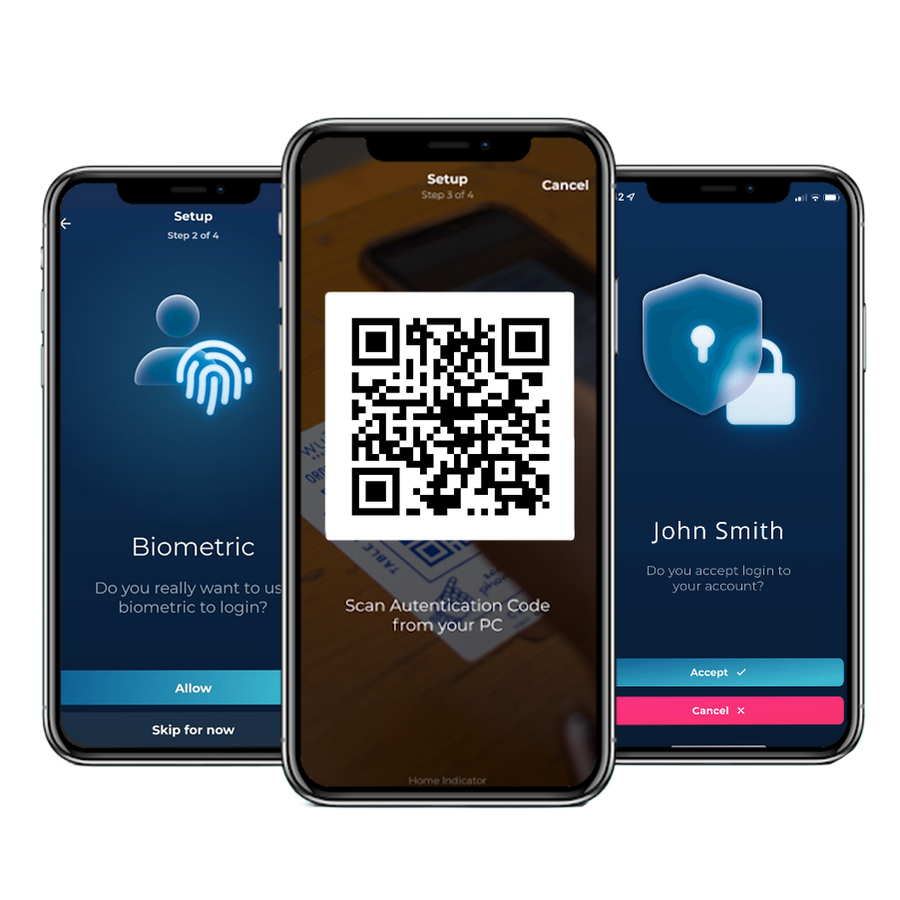
La schermata di blocco mostra un codice QR. Il dipendente lo scansiona nell’app e approva la richiesta.
Soluzione SSO aziendale per l'identità che avete già
Hideez può fungere da identity provider SSO per le sue applicazioni oppure lavorare insieme a Microsoft Entra ID e Active Directory per aggiungere l'autenticazione senza password al suo ambiente esistente. Utenti e gruppi vengono sincronizzati dalla sua directory, quindi non è necessario gestire un database utenti separato.
Per le organizzazioni che devono mantenere l'autenticazione SSO all'interno della propria infrastruttura, Hideez può essere distribuito on-premises o in un cloud privato isolato, con un dominio di accesso personalizzato sotto il proprio DNS.
- Sincronizzi utenti e gruppi da Active Directory o Entra ID
- Colleghi le applicazioni SSO tramite SAML o OpenID Connect
- Utilizzi un dominio di accesso SSO personalizzato sotto il proprio DNS
- Distribuisca l'SSO aziendale nel cloud, in un cloud privato isolato o completamente on-premises
Ogni accesso SSO, ogni applicazione, un unico registro
Hideez Server registra ogni autenticazione SSO insieme alla persona, all'applicazione aperta e al metodo utilizzato. Lo stesso registro copre sia le applicazioni moderne dietro l'SSO sia quelle più datate raggiunte tramite AuthShield.
| Data inizio↓ | Data fine | Dipendente | Applicazione | Metodo |
|---|---|---|---|---|
| 04/08/2026 09:14 | Active | Emma Wilson | Microsoft 365 | Passkey |
| 04/08/2026 09:02 | 04/08/2026 09:11 | James Carter | Microsoft 365 | Approvazione push |
| 04/08/2026 08:47 | 04/08/2026 08:58 | Michael Brown | Portale qualità (AuthShield) | Hideez Key |
| 03/08/2026 17:26 | 03/08/2026 18:02 | Olivia Davis | CRM interno | Passkey |
| 03/08/2026 13:05 | 03/08/2026 17:58 | Sophia Miller | Desktop remoto | Hideez Key |
| 03/08/2026 07:12 | 03/08/2026 12:44 | James Carter | Portale qualità (AuthShield) | Approvazione push |
- Una persona resta un'unica identità in tutte le applicazioni SSO
- Il metodo viene registrato per ogni accesso SSO, così la copertura senza password è misurabile
- App moderne dietro SSO e app più vecchie dietro AuthShield nello stesso log
- Traccia pronta per l’esportazione per HIPAA, PCI DSS, NIS2 e DORA
SSO senza password, oltre le password e l'MFA tradizionale
 |
Password + MFA con OTP | IdP solo cloud | ADFS on-prem | |
|---|---|---|---|---|
| Accesso senza password e senza codici da digitare | sì | Limitato | ||
| Credenziali FIDO2 resistenti al phishing | sì | sì | Limitato | |
| Copre le applicazioni senza supporto SAML o OIDC | sì | sì | ||
| Funziona completamente on-premise o in un cloud privato | sì | sì | sì | |
| Login desktop Windows incluso | sì | Limitato |
Inizi con un'applicazione SSO
Una proof of concept di 30 giorni, solo con telefono, su un’unica applicazione a Sua scelta. Aggiunga le altre una volta che l’accesso si dimostra efficace.
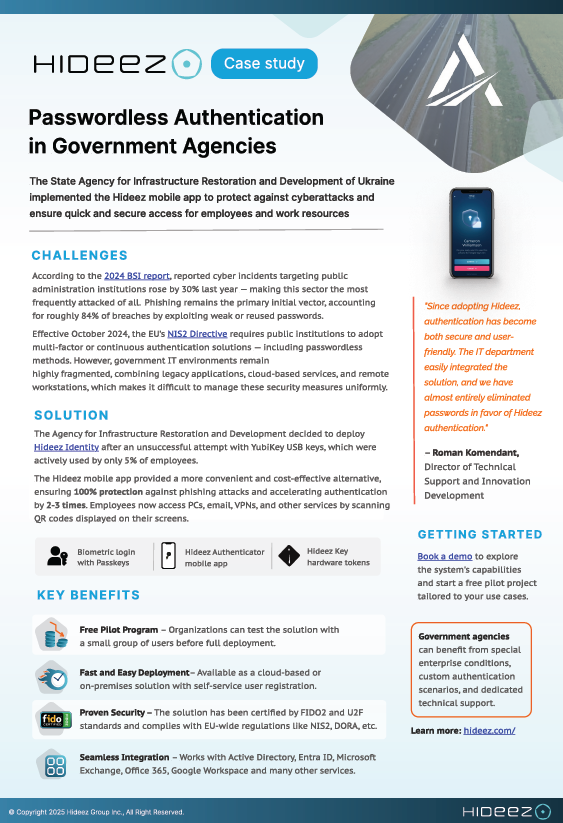
Come un ente governativo ha sostituito le chiavi hardware con l'autenticazione SSO mobile
Da quando abbiamo adottato Hideez, l’autenticazione è diventata sia sicura che facile da usare. Abbiamo eliminato quasi completamente le password a favore dell’autenticazione Hideez
State Agency for Restoration of Ukraine


Le domande dei team IT
Cos’è il single sign-on, e in cosa differisce da un gestore di password?
Il single sign-on elimina completamente la seconda password: l’applicazione si fida di un identity provider che ha già verificato la persona. Un gestore di password continua invece a memorizzare e digitare una password in ogni applicazione, quindi ciascuna di quelle password continua a esistere e può ancora essere sottratta tramite phishing o riutilizzata.
L'SSO senza password è davvero più sicuro di una password più un codice monouso?
Sì, e il motivo è specifico. Un codice temporaneo può essere letto al telefono, digitato in una pagina di accesso falsa o approvato da un utente stanco. Una credenziale FIDO2 è legata esattamente al sito che l’ha emessa e non lascia mai il dispositivo, quindi non c’è nulla da consegnare. Molti team presumono che più passaggi significhino più sicurezza. Ciò che conta è se un qualsiasi passaggio può essere intercettato.
Dobbiamo sostituire Microsoft Entra ID o Active Directory?
No. Hideez può fungere da provider di identità SSO e può anche federarsi con Entra ID o Active Directory aggiungendovi l'accesso senza password. Utenti, gruppi e policy vengono replicati dalla directory già in uso.
Quali applicazioni può coprire la soluzione SSO di Hideez?
Qualsiasi applicazione che parli SAML 2.0 o OpenID Connect, il che copre Microsoft 365 e la maggior parte delle applicazioni web moderne. Le applicazioni senza supporto SSO moderno sono coperte tramite Hideez AuthShield, che si posiziona davanti a esse e autentica gli utenti senza modifiche all’applicazione stessa.
Possiamo ospitare noi stessi la soluzione SSO aziendale?
Sì. La stessa piattaforma SSO funziona nel nostro cloud, in un cloud privato isolato o completamente on-premise all'interno del suo perimetro, su un dominio di accesso personalizzato. Le organizzazioni soggette a normative sulla residenza dei dati scelgono generalmente una di queste ultime due opzioni.
Cosa succede se qualcuno perde il telefono?
Revochi la credenziale dalla console di amministrazione SSO e ne emetta una nuova. I team che non possono tollerare alcun tempo di inattività assegnano agli utenti critici una Hideez Key come seconda credenziale, in modo che le due funzionino in modo intercambiabile.
Funziona su macOS e Linux?
L’accesso ad account di lavoro e applicazioni web funziona da qualsiasi sistema operativo, inclusi macOS, Linux e ChromeOS. Il blocco e lo sblocco del dispositivo stesso sono disponibili solo su Windows 10 e 11.
Quanto tempo richiede l'adozione dell'SSO?
Un proof of concept SSO per una singola applicazione viene solitamente completato entro la stessa settimana, solo con lo smartphone. Le implementazioni complete sono scandite dal numero di applicazioni collegate, non dall'autenticazione in sé.
Che effetto ha l'SSO senza password sui nostri ticket di reset della password?
Quando un’applicazione non ha una password, non c’è nemmeno un reset da fare. I benchmark di settore stimano un singolo reset in circa 70 $ considerando il tempo dell’helpdesk, ed è da qui che arriva la maggior parte del ritorno sull’investimento. Confronti questi numeri con il volume di ticket della Sua organizzazione insieme al nostro team.
Provi l’SSO passwordless sul Suo stack
Prenoti una demo o richieda un preventivo. Proof of concept gratuita di 30 giorni, solo con telefono per iniziare.