
Piattaforma di gestione delle identità del personale
Hideez Workforce Identity è una piattaforma di gestione delle identità del personale che offre un accesso rapido e resistente al phishing su postazioni di lavoro, applicazioni aziendali e sistemi legacy fuori dalla portata del SSO moderno.

La sfida della gestione delle identità del personale: perché l’accesso tradizionale fallisce
L’autenticazione legacy e i controlli di accesso manuali aumentano il carico dell’helpdesk, l’esposizione al rischio e gli attriti di conformità negli ambienti aziendali.

Alto rischio di violazioni basate sulle credenziali
Le credenziali rubate restano uno dei principali vettori di attacco in azienda. Password e MFA vulnerabile al phishing possono esporre gli account del personale a phishing, furto di credenziali e attacchi adversary-in-the-middle (AiTM).

Sovraccarico di helpdesk e IT
I reset delle password e le modifiche manuali degli accessi consumano tempo prezioso del supporto IT, generano lavoro ripetitivo per i team di helpdesk e rallentano la produttività dei dipendenti.

Onboarding lento e lacune nell’offboarding
Il provisioning manuale degli accessi può ritardare la produttività dei nuovi assunti fin dal primo giorno, mentre un offboarding incoerente può lasciare attivi account e permessi non necessari dopo l’uscita dei dipendenti.

Conformità complessa e attriti negli audit
Dimostrare i controlli di accesso in ambienti ibridi, postazioni di lavoro condivise e applicazioni legacy richiede policy coerenti, visibilità centralizzata e audit trail dettagliati.
Come Hideez semplifica la gestione delle identità del personale

Passwordless Everywhere
Estendi il login passwordless oltre le moderne applicazioni SSO. Hideez aiuta a proteggere servizi cloud, workstation, VPN, RDP e sistemi legacy che non supportano FIDO o SSO standard.

Identità e audit centralizzati
Gestisci utenti, diritti di accesso e workstation da un’unica console di amministrazione. Traccia ogni evento di login, sblocco, logout e accesso ai servizi con log di audit dettagliati per sicurezza e compliance.

Smart Endpoint Security
Proteggi workstation Windows condivise e personali con login passwordless rapido, blocco di prossimità e visibilità delle sessioni. Saprai chi ha avuto accesso a ogni dispositivo, quando, e potrai prevenire sessioni lasciate incustodite.

Distribuzione flessibile
Distribuisci Hideez nel cloud, in un private cloud o completamente on-premises. Mantieni i dati di identità sotto il tuo controllo, supportando al tempo stesso l’accesso sicuro della forza lavoro in diversi settori e modelli infrastrutturali.
Che cos’è la soluzione Workforce IAM di Hideez?
Hideez Workforce Identity integra autenticazione passwordless, SSO, MFA e accesso alle workstation in un unico livello di identità sicuro per la gestione delle identità e degli accessi del personale (Workforce IAM, WIAM). Aiuta le aziende a eliminare le password nelle applicazioni cloud moderne, nei PC condivisi e negli ambienti legacy, migliorando la velocità di login, riducendo i rischi legati alla condivisione delle credenziali e offrendo ai team IT piena visibilità su chi ha avuto accesso a cosa, quando e da quale dispositivo.


Avvii la trasformazione dell’identità del personale su un’unica piattaforma Workforce IAM
Il nostro sistema Workforce IAM consente l'accesso senza password sia ai servizi legacy che a quelli moderni utilizzando una gamma di strumenti resistenti al phishing:

Hideez Server
Hideez Server è il livello di controllo centrale del Workforce IAM. Riunisce metodi di accesso senza password, integrazioni applicative, policy di accesso alle postazioni di lavoro, gestione utenti e visibilità di audit in un’unica console di amministrazione.
I team IT possono usarlo per proteggere l'accesso ad app moderne, servizi legacy e postazioni Windows, integrandolo con gli ambienti IAM già in uso. Hideez Server supporta il deployment in cloud, cloud privato e on-premise, in configurazioni single-tenant o multi-tenant.
SCOPRI DI PIÙ
Autenticatore mobile
Hideez Authenticator è una chiave di identità tascabile per la forza lavoro moderna. Sempre con il dipendente, combina il possesso di uno smartphone affidabile con la verifica biometrica per offrire un accesso rapido e passwordless a workstation e account aziendali.
I dipendenti possono sbloccare computer, approvare accessi e usare applicazioni di lavoro senza digitare password, mentre la protezione basata sulla prossimità aiuta a proteggere le sessioni aperte quando gli utenti si allontanano dai propri dispositivi.
SCOPRI DI PIÙ
Passkeys
Le Passkeys consentono un accesso sicuro e passwordless ai servizi web tramite autenticazione crittografica FIDO/WebAuthn. Gli utenti possono verificare la propria identità con metodi integrati nel dispositivo, come impronta digitale, riconoscimento facciale o PIN del dispositivo, oppure utilizzare una security key esterna come YubiKey, Hideez Key o qualsiasi altro dispositivo certificato FIDO.
Invece di trasmettere segreti condivisi, le Passkeys utilizzano una chiave crittografica privata che rimane protetta sul dispositivo dell’utente. Questo rende l’autenticazione resistente al phishing e aiuta a prevenire il furto di credenziali e il riutilizzo delle password.
SCOPRI DI PIÙ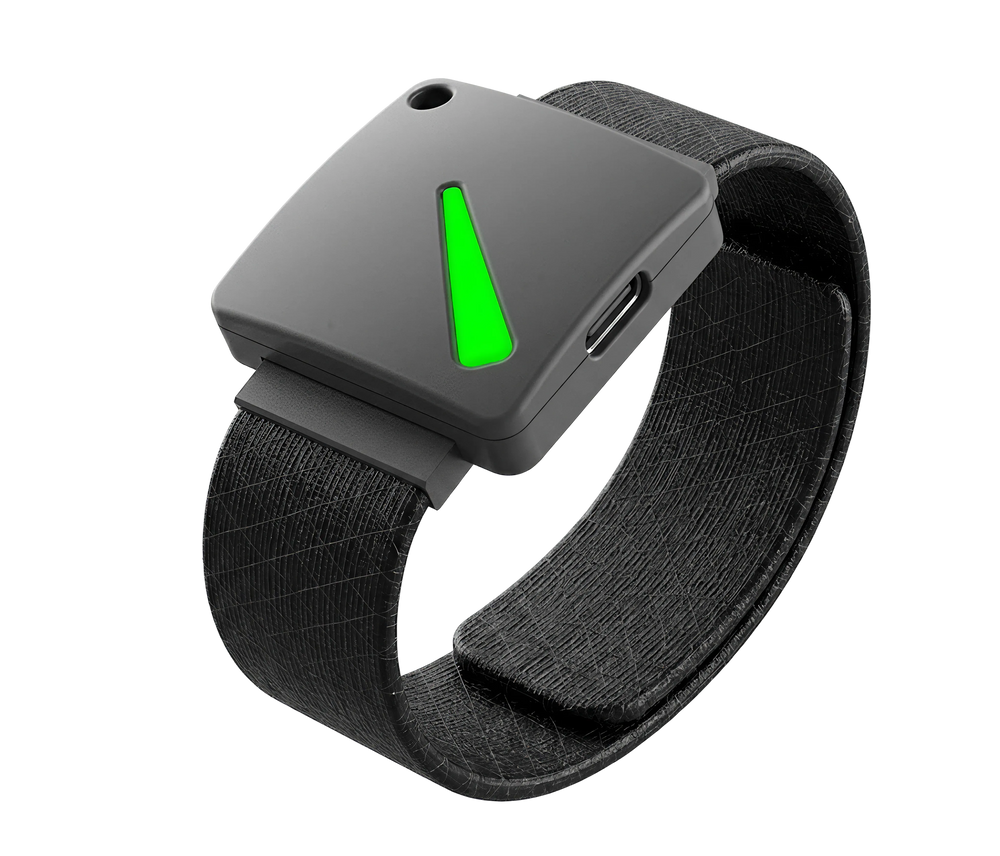
Chiavi di sicurezza FIDO2
Hideez Key è un autenticatore hardware per la gestione degli accessi del personale in ambienti con requisiti di sicurezza elevati. Indossato al polso o al collo, dà ai dipendenti una chiave di identità fisica dedicata per l’accesso senza password a postazioni di lavoro, account aziendali e porte dell’ufficio.
Con il supporto per Bluetooth, NFC, RFID e USB, Hideez Key aiuta le organizzazioni a proteggere sia l’accesso digitale sia quello fisico in un unico dispositivo compatto, risultando particolarmente utile nei luoghi di lavoro con restrizioni, dove gli smartphone non sono consentiti o è richiesta un’autenticazione hardware-based più robusta.
SCOPRI DI PIÙ
MFA e SSO per applicazioni legacy
Hideez AuthShield estende l’autenticazione senza password e la MFA alle applicazioni web legacy supportate, mai progettate per IAM o SSO moderni, ampliando la copertura del Workforce IAM a queste applicazioni. Aiuta le organizzazioni a modernizzare l’autenticazione senza ricostruire o sostituire applicazioni critiche.
SCOPRI DI PIÙ
Workforce IAM senza password oltre il cloud
Il Workforce IAM moderno protegge ciò che è già pronto per lo SSO. Hideez Workforce Identity aiuta a proteggere anche tutto il resto, offrendo un accesso rapido e senza password a servizi legacy, postazioni di lavoro, VPN, RDP e sistemi aziendali critici.
Il nostro server FIDO2/WebAuthn consente agli utenti di accedere con Passkey, un'app mobile o token FIDO fisici. Ecco alcuni esempi di servizi supportati:
- Collaborazione: Google Workspace, Microsoft 365, Dropbox, DocuSign
- App legacy: EHR, ERP, MES, SCADA, gestione stipendi, ecc.
- Lavoro da remoto: TeamViewer, AnyDesk, Citrix Workspace
- CRM: Zoho, Salesforce, HubSpot, Zendesk
- Gestione progetti: Trello, Jira, Asana, Miro
- Videoconferenza: Zoom, MS Teams, Skype

Autenticazione hands-free con piena visibilità di audit
Bloccare manualmente lo schermo è facile da dimenticare, soprattutto in ambienti dinamici con PC condivisi, team su turni e passaggi frequenti da una workstation all’altra. Ma ogni sessione lasciata incustodita crea un rischio di accesso non autorizzato, responsabilità debole e audit trail incompleti.
Hideez Workforce Identity aggiunge al Workforce IAM una sicurezza proattiva delle postazioni di lavoro tramite l’autenticazione di prossimità. I dipendenti accedono senza password e il sistema può bloccare automaticamente l’accesso quando l’utente autorizzato si allontana, aiutando i team IT a proteggere gli endpoint senza rallentare le persone.
Impatto sul business e riduzione dei costi dell’helpdesk
Riduca il carico dell’helpdesk sostituendo l’accesso con password con l’autenticazione FIDO2 senza password, eliminando i blocchi legati alle password e le richieste di supporto ripetitive.
Acceleri l’accesso dei nuovi assunti con flussi di provisioning automatizzati che collegano identità utente, credenziali FIDO2 e accesso SSO, riducendo l’amministrazione IT manuale.
Consolidi gli strumenti di identità frammentati – app MFA, password manager e soluzioni di accesso desktop – in un’unica piattaforma Workforce Identity centralizzata.
Riduca l’onere amministrativo con controllo degli accessi centralizzato, policy basate sui ruoli, flussi self-service e gestione automatizzata del ciclo di vita delle identità.





Conformità e prontezza normativa: soddisfi i requisiti di sicurezza senza sacrificare la produttività
Sostenga gli sforzi di conformità a framework e normative come PCI DSS, HIPAA, GDPR, NIS2, ISO 27001 e SOC 2 con un’autenticazione e controlli di accesso più solidi:

MFA resistente al phishing
Imponga l’autenticazione FIDO2/WebAuthn per proteggersi da phishing, furto di credenziali e attacchi man-in-the-middle.

Blocco della sessione di prossimità
Blocchi automaticamente le postazioni di lavoro quando gli utenti si allontanano, applicando le policy di controllo degli accessi e prevenendo accessi non autorizzati.

Tracciabilità sulle postazioni di lavoro condivise
Colleghi l’attività delle postazioni ai singoli utenti e offra accessi sicuri sui PC condivisi al posto di account locali generici.
Programma partner Hideez
Progettato per VAD, system integrator e provider di servizi gestiti nel settore della sicurezza IT
DIVENTA UN PARTNERFAQ
In che modo l’autenticazione passwordless è migliore rispetto alla MFA tradizionale?
La MFA tradizionale di solito combina una password con un codice monouso, o OTP. Pur migliorando la sicurezza, può comunque risultare scomoda per gli utenti ed essere vulnerabile a phishing, intercettazione e attacchi di MFA fatigue. Hideez utilizza l’autenticazione passwordless basata sulla crittografia a chiave pubblica e privata. La chiave privata rimane sempre sul dispositivo dell’utente e non viene mai condivisa né trasmessa, rendendo inefficace il phishing: anche se un utente finisce su un sito falso, non ci sono credenziali da rubare. Il login passwordless è anche più veloce e più comodo per il lavoro quotidiano.
Cosa include la versione gratuita?
L’offerta cloud multi-tenant per il Workforce IAM è gratuita fino a 5 utenti. Include le stesse funzionalità principali delle altre opzioni di deployment, tra cui passwordless SSO, MFA, blocco e sblocco delle workstation, integrazione con Active Directory ed Entra ID e supporto per più metodi di autenticazione.
Posso fare self-hosting di Hideez?
Sì. Hideez supporta deployment di Workforce IAM sulla Sua infrastruttura. È disponibile anche come deployment dedicato in cloud privato, isolato per la Sua organizzazione.
Dobbiamo sostituire i nostri sistemi MFA/SSO esistenti?
No. Hideez funziona con la Sua infrastruttura di sicurezza e i Suoi strumenti di Workforce IAM esistenti, quindi non è necessario sostituire i sistemi attuali. Si integra con Entra ID, Active Directory, altri identity provider e qualsiasi security key certificata FIDO2, e può essere utilizzato insieme alle altre soluzioni di sicurezza già in uso.
Quanto tempo serve per distribuire Hideez?
Dipende dal modello di implementazione scelto. L’opzione più rapida è la versione cloud multi-tenant, che può essere distribuita autonomamente in pochi minuti, con le integrazioni principali configurate in poche ore. Le implementazioni on-prem richiedono più lavoro, ma il nostro team di supporto assiste durante l’intero processo.
Quanti utenti possono autenticarsi su un dispositivo condiviso con la piattaforma Hideez?
Non esiste un limite fisso. Hideez è progettato per ambienti con dispositivi condivisi, dove molti dipendenti utilizzano la stessa workstation. Può funzionare anche in ambienti offline e in luoghi di lavoro dove l’uso dei telefoni cellulari è limitato.
Come funziona l'autenticazione di prossimità e i limiti di distanza sono configurabili?
L’autenticazione di prossimità funziona tramite una connessione Bluetooth tra l’autenticatore dell’utente e la workstation. Gli amministratori IT possono configurare il raggio di prossimità richiesto nella nostra applicazione desktop, con impostazioni di distanza disponibili fino a circa 0,5 metri. Per le workstation condivise, Hideez supporta anche metodi di login touch-based, come l’autenticazione tramite tag NFC e l’accesso Tap-and-Go. Questo offre alle organizzazioni maggiore flessibilità negli ambienti in cui i dipendenti hanno bisogno di un accesso rapido e sicuro senza digitare password.
Porti l’accesso senza password su ogni postazione di lavoro e applicazione
Prenoti una demo con il nostro team oppure inizi con il cloud multi-tenant gratuito fino a 5 utenti e colleghi oggi stesso le Sue prime postazioni di lavoro.