
Plataforma de gestión de identidades para empleados
Hideez Workforce Identity es una plataforma de gestión de identidades para empleados que ofrece un inicio de sesión rápido y resistente al phishing en puestos de trabajo, aplicaciones empresariales y sistemas heredados fuera del alcance del SSO moderno.

El reto de la gestión de identidades para empleados: por qué falla el acceso tradicional
La autenticación heredada y los controles de acceso manuales aumentan la carga de la mesa de ayuda, la exposición a riesgos y la fricción de cumplimiento en los entornos empresariales.

Alto riesgo de brechas basadas en credenciales
Las credenciales robadas siguen siendo un vector de ataque principal en las empresas. Las contraseñas y la MFA vulnerable al phishing pueden exponer las cuentas de los empleados a phishing, robo de credenciales y ataques adversary-in-the-middle (AiTM).

Sobrecarga de la mesa de ayuda y de TI
Los restablecimientos de contraseña y los cambios de acceso manuales consumen un tiempo valioso del soporte de TI, generan trabajo repetitivo para la mesa de ayuda y retrasan la productividad de los empleados.

Onboarding lento y brechas en el offboarding
El aprovisionamiento manual de accesos puede retrasar la productividad de los nuevos empleados desde el primer día, mientras que un offboarding inconsistente puede dejar activas cuentas y permisos innecesarios tras su salida.

Complejidad de cumplimiento y fricción en auditorías
Demostrar los controles de acceso en entornos híbridos, puestos de trabajo compartidos y aplicaciones heredadas exige políticas coherentes, visibilidad centralizada y pistas de auditoría detalladas.
Cómo Hideez simplifica la gestión de identidades para empleados

Passwordless en todas partes
Extienda el inicio de sesión sin contraseña más allá de las aplicaciones SSO modernas. Hideez ayuda a proteger servicios en la nube, estaciones de trabajo, VPNs, RDP y sistemas heredados que no son compatibles con FIDO ni con SSO estándar.

Identidad y auditoría centralizadas
Gestione usuarios, derechos de acceso y estaciones de trabajo desde una única consola de administración. Registre cada inicio de sesión, desbloqueo, cierre de sesión y evento de acceso a servicios con logs de auditoría detallados para seguridad y cumplimiento normativo.

Seguridad inteligente de endpoints
Proteja estaciones de trabajo Windows compartidas y personales con inicio de sesión rápido sin contraseña, bloqueo por proximidad y visibilidad de sesiones. Sepa quién accedió a cada dispositivo, cuándo lo hizo, y evite sesiones desatendidas.

Implementación flexible
Implemente Hideez en la nube, en una nube privada o completamente on premises. Mantenga los datos de identidad bajo su control mientras ofrece acceso seguro a la plantilla en distintos sectores y modelos de infraestructura.
¿Qué es la solución de Workforce IAM de Hideez?
Hideez Workforce Identity integra autenticación sin contraseña, SSO, MFA y acceso a estaciones de trabajo en una capa de identidad segura para la gestión de identidades y accesos de los empleados (Workforce IAM, WIAM). Ayuda a las empresas a eliminar contraseñas en aplicaciones cloud modernas, PCs compartidos y entornos heredados, al tiempo que mejora la velocidad de inicio de sesión, reduce los riesgos de uso compartido de credenciales y ofrece a los equipos de TI visibilidad completa sobre quién accedió a qué, cuándo y desde qué dispositivo.


Inicie la transformación de la identidad de sus empleados en una única plataforma de Workforce IAM
Nuestro sistema de IAM para la plantilla permite el acceso sin contraseña tanto a servicios heredados como modernos mediante diversas herramientas resistentes al phishing:

Hideez Server
Hideez Server es la capa de control central del Workforce IAM. Reúne métodos de inicio de sesión sin contraseña, integraciones de aplicaciones, políticas de acceso a puestos de trabajo, gestión de usuarios y visibilidad de auditoría en una sola consola de administración.
Los equipos de TI pueden usarlo para proteger el acceso a aplicaciones modernas, servicios heredados y estaciones de trabajo Windows, integrándolo con los entornos IAM ya existentes. Hideez Server admite implementación en la nube, nube privada y on-premise, en configuraciones de un solo inquilino o multiinquilino.
MÁS INFORMACIÓN
Autenticador móvil
Hideez Authenticator es una llave de identidad de bolsillo para la plantilla moderna. Siempre con el empleado, combina la posesión de un smartphone de confianza con verificación biométrica para ofrecer acceso rápido y sin contraseña a estaciones de trabajo y cuentas empresariales.
Los empleados pueden desbloquear ordenadores, aprobar inicios de sesión y acceder a aplicaciones de trabajo sin escribir contraseñas, mientras que la protección basada en proximidad ayuda a proteger sesiones abiertas cuando los usuarios se alejan de sus dispositivos.
MÁS INFORMACIÓN
Passkeys
Las passkeys permiten un acceso seguro y sin contraseña a servicios web mediante autenticación criptográfica FIDO/WebAuthn. Los usuarios pueden verificar su identidad con métodos integrados del dispositivo, como huella dactilar, reconocimiento facial o PIN del dispositivo, o utilizar una llave de seguridad externa como YubiKey, Hideez Key o cualquier otro dispositivo certificado FIDO.
En lugar de transmitir secretos compartidos, las passkeys utilizan una clave criptográfica privada que permanece protegida en el dispositivo del usuario. Esto hace que la autenticación sea resistente al phishing y ayuda a prevenir el robo de credenciales y la reutilización de contraseñas.
MÁS INFORMACIÓN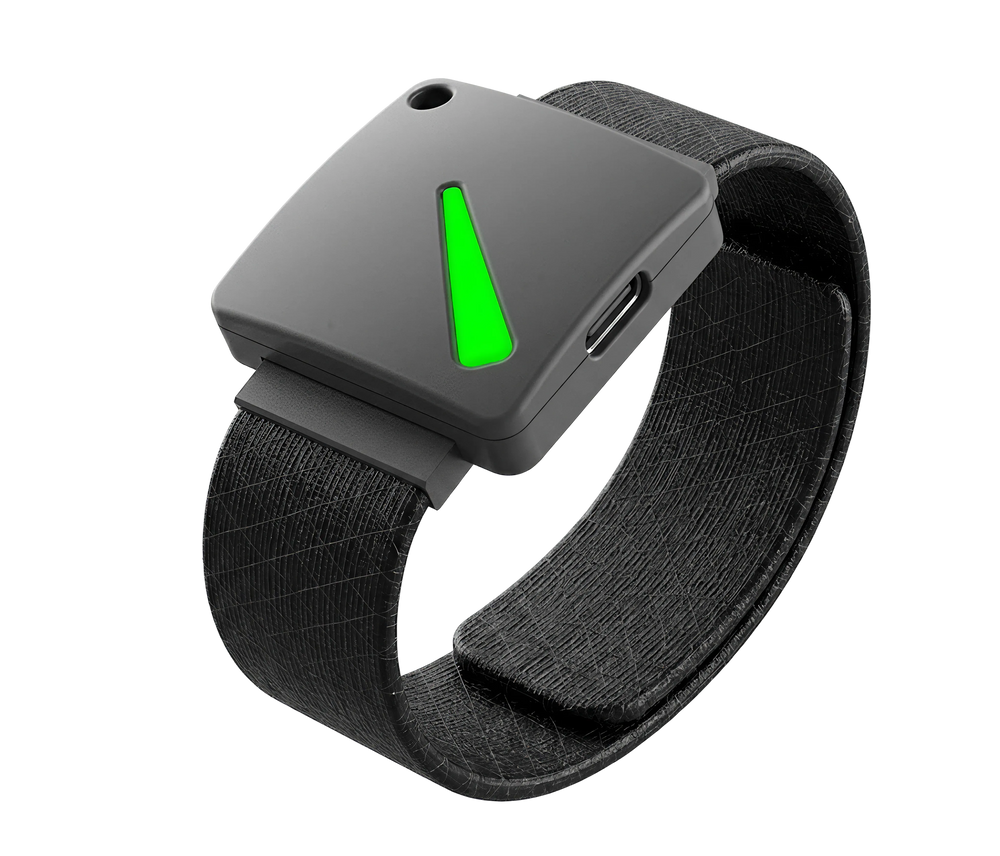
Llaves de seguridad FIDO2
Hideez Key es un autenticador de hardware para la gestión de accesos de los empleados en entornos con requisitos de seguridad exigentes. Llevado en una pulsera o un cordón, da a cada empleado una llave de identidad física propia para el acceso sin contraseña a puestos de trabajo, cuentas de negocio y puertas de la oficina.
Con compatibilidad con Bluetooth, NFC, RFID y USB, Hideez Key ayuda a las organizaciones a proteger tanto el acceso digital como el físico en un único dispositivo compacto, lo que lo hace especialmente útil para lugares de trabajo restringidos donde no se permiten smartphones o donde se requiere una autenticación hardware más robusta.
MÁS INFORMACIÓN
MFA y SSO para aplicaciones heredadas
Hideez AuthShield extiende la autenticación sin contraseña y la MFA a aplicaciones web heredadas compatibles que nunca se diseñaron para el IAM o el SSO modernos, ampliando la cobertura del Workforce IAM a estas aplicaciones. Ayuda a las organizaciones a modernizar la autenticación sin reconstruir ni sustituir aplicaciones críticas.
MÁS INFORMACIÓN
Workforce IAM sin contraseña más allá de la nube
El Workforce IAM moderno protege lo que ya está listo para SSO. Hideez Workforce Identity ayuda a proteger todo lo demás también, aportando acceso rápido y sin contraseña a servicios heredados, estaciones de trabajo, VPN, RDP y sistemas críticos del negocio.
Nuestro servidor FIDO2/WebAuthn permite a los usuarios iniciar sesión con Passkeys, una app móvil o tokens FIDO físicos. Estos son solo algunos ejemplos de servicios compatibles:
- Colaboración: Google Workspace, Microsoft 365, Dropbox, DocuSign
- Aplicaciones heredadas: EHR, ERP, MES, SCADA, nóminas, etc.
- Trabajo remoto: TeamViewer, AnyDesk, Citrix Workspace
- CRM: Zoho, Salesforce, HubSpot, Zendesk
- Gestión de proyectos: Trello, Jira, Asana, Miro
- Videoconferencia: Zoom, MS Teams, Skype

Autenticación manos libres con visibilidad completa de auditoría
Bloquear la pantalla manualmente es fácil de olvidar, especialmente en entornos dinámicos con PCs compartidos, equipos por turnos y cambios frecuentes de estación de trabajo. Pero cada sesión desatendida crea un riesgo de acceso no autorizado, responsabilidad insuficiente y trazabilidad incompleta.
Hideez Workforce Identity añade al Workforce IAM una seguridad proactiva de los puestos de trabajo mediante la autenticación por proximidad. Los empleados inician sesión sin contraseña y el sistema puede bloquear el acceso automáticamente cuando el usuario autorizado se aleja, lo que ayuda a los equipos de TI a proteger los endpoints sin frenar a las personas.
Impacto en el negocio y reducción de costes de la mesa de ayuda
Reduzca la carga de la mesa de ayuda sustituyendo el inicio de sesión con contraseña por la autenticación FIDO2 sin contraseña, eliminando los bloqueos por contraseña y las solicitudes de soporte repetitivas.
Acelere el acceso de los nuevos empleados con flujos de aprovisionamiento automatizados que conectan la identidad del usuario, las credenciales FIDO2 y el acceso SSO, reduciendo la administración manual de TI.
Consolide las herramientas de identidad fragmentadas, como apps de MFA, gestores de contraseñas y soluciones de inicio de sesión en el escritorio, en una plataforma centralizada de identidad para empleados.
Reduzca la carga administrativa con control de acceso centralizado, políticas basadas en roles, flujos de autoservicio y gestión automatizada del ciclo de vida de las identidades.





Cumplimiento y preparación normativa: cumpla los requisitos de seguridad sin sacrificar la productividad
Respalde el cumplimiento de marcos y normativas como PCI DSS, HIPAA, GDPR, NIS2, ISO 27001 y SOC 2 con una autenticación y unos controles de acceso más sólidos:

MFA resistente al phishing
Imponga la autenticación FIDO2/WebAuthn para protegerse frente al phishing, el robo de credenciales y los ataques man-in-the-middle.

Bloqueo de sesión por proximidad
Bloquee automáticamente los puestos de trabajo cuando los usuarios se alejen, reforzando las políticas de control de acceso y evitando accesos no autorizados.

Responsabilidad en puestos de trabajo compartidos
Vincule la actividad de cada puesto de trabajo a usuarios concretos y ofrezca inicios de sesión seguros en PC compartidos en lugar de cuentas locales genéricas.
Programa de partners de Hideez
Diseñado para VADs, integradores de sistemas y proveedores de servicios gestionados en seguridad informática
CONVIÉRTETE EN SOCIOPreguntas frecuentes
¿En qué es mejor la autenticación sin contraseña que el MFA tradicional?
El MFA tradicional suele combinar una contraseña con un código de un solo uso, u OTP. Aunque mejora la seguridad, sigue pudiendo resultar incómodo para los usuarios y vulnerable al phishing, la interceptación y los ataques de fatiga MFA. Hideez utiliza autenticación sin contraseña basada en criptografía de clave pública y privada. La clave privada permanece siempre en el dispositivo del usuario y nunca se comparte ni se transmite, lo que hace que el phishing sea ineficaz: incluso si un usuario llega a un sitio web falso, no hay credenciales que robar. El inicio de sesión sin contraseña también es más rápido y cómodo para el trabajo diario.
¿Qué incluye la versión gratuita?
La oferta de nube multiinquilino para Workforce IAM es gratuita para hasta 5 usuarios. Incluye la misma funcionalidad principal que otras opciones de implementación, como SSO sin contraseña, MFA, bloqueo y desbloqueo de estaciones de trabajo, integración con Active Directory y Entra ID, y compatibilidad con múltiples métodos de autenticación.
¿Puedo alojar Hideez en mi propia infraestructura?
Sí. Hideez admite despliegues de Workforce IAM en su propia infraestructura. También está disponible como despliegue dedicado en nube privada, aislado para su organización.
¿Tenemos que sustituir nuestros sistemas MFA/SSO actuales?
No. Hideez funciona con su infraestructura de seguridad y sus herramientas de Workforce IAM existentes, por lo que no es necesario sustituir sus sistemas actuales. Se integra con Entra ID, Active Directory, otros proveedores de identidad y cualquier llave de seguridad certificada FIDO2, y puede utilizarse junto con otras soluciones de seguridad ya implementadas.
¿Cuánto tiempo se tarda en implementar Hideez?
Depende del modelo de implementación elegido. La opción más rápida es la versión cloud multi-tenant, que puede desplegarse de forma independiente en minutos, con integraciones principales configuradas en pocas horas. Las implementaciones on-prem requieren más esfuerzo, pero nuestro equipo de soporte acompaña durante todo el proceso.
¿Cuántos usuarios pueden autenticarse en un dispositivo compartido con la plataforma Hideez?
No hay un límite fijo. Hideez está diseñado para entornos con dispositivos compartidos donde muchos empleados utilizan la misma estación de trabajo. También puede funcionar en entornos offline y en lugares de trabajo donde el uso de teléfonos móviles está restringido.
¿Cómo funciona la autenticación por proximidad y se pueden configurar los límites de distancia?
La autenticación por proximidad funciona mediante una conexión Bluetooth entre el autenticador del usuario y la estación de trabajo. Los administradores de TI pueden configurar el rango de proximidad requerido en nuestra aplicación de escritorio, con ajustes de distancia disponibles hasta aproximadamente 0,5 metros. Para estaciones de trabajo compartidas, Hideez también admite métodos de inicio de sesión por contacto, como la autenticación mediante etiqueta NFC y el acceso Tap-and-Go. Esto ofrece a las organizaciones mayor flexibilidad en entornos donde los empleados necesitan acceso rápido y seguro sin escribir contraseñas.
Lleve el acceso sin contraseña a todos los puestos de trabajo y aplicaciones
Solicite una demo con nuestro equipo o empiece con la nube multiinquilino gratuita para hasta 5 usuarios y conecte hoy mismo sus primeros puestos de trabajo.